

First Time in a Fancy Cafe AI Prompt: Keep the Reveal in Order
A useful first time in a fancy cafe AI prompt must explain what each person does and which surface is the table. “An awkward moment in a luxury cafe” leaves too much open: you might get an expensive drink, a confused face and none of the seating joke.
If you use Fancy Cafe AI's preset, the scene instructions are already supplied. Upload two separate photos; there is no custom-prompt field in that form. The prompt below is an original starting point for a separate video tool that accepts scene instructions. The review checklist works for either approach.
Describe the furniture before the reaction
The visual dependency is simple: the viewer must understand the furniture before the first customer reacts to it. Keep the low bench and small round tabletop visible together. A tight face shot may show embarrassment but lose its cause.
Specify two roles and give each a short, consistent name. “First customer” and “arriving customer” are less ambiguous than switching between “you,” “the friend” and “the man” halfway through the prompt. Their clothing can help distinguish them, but a text description is not a guarantee that a model will preserve every detail.
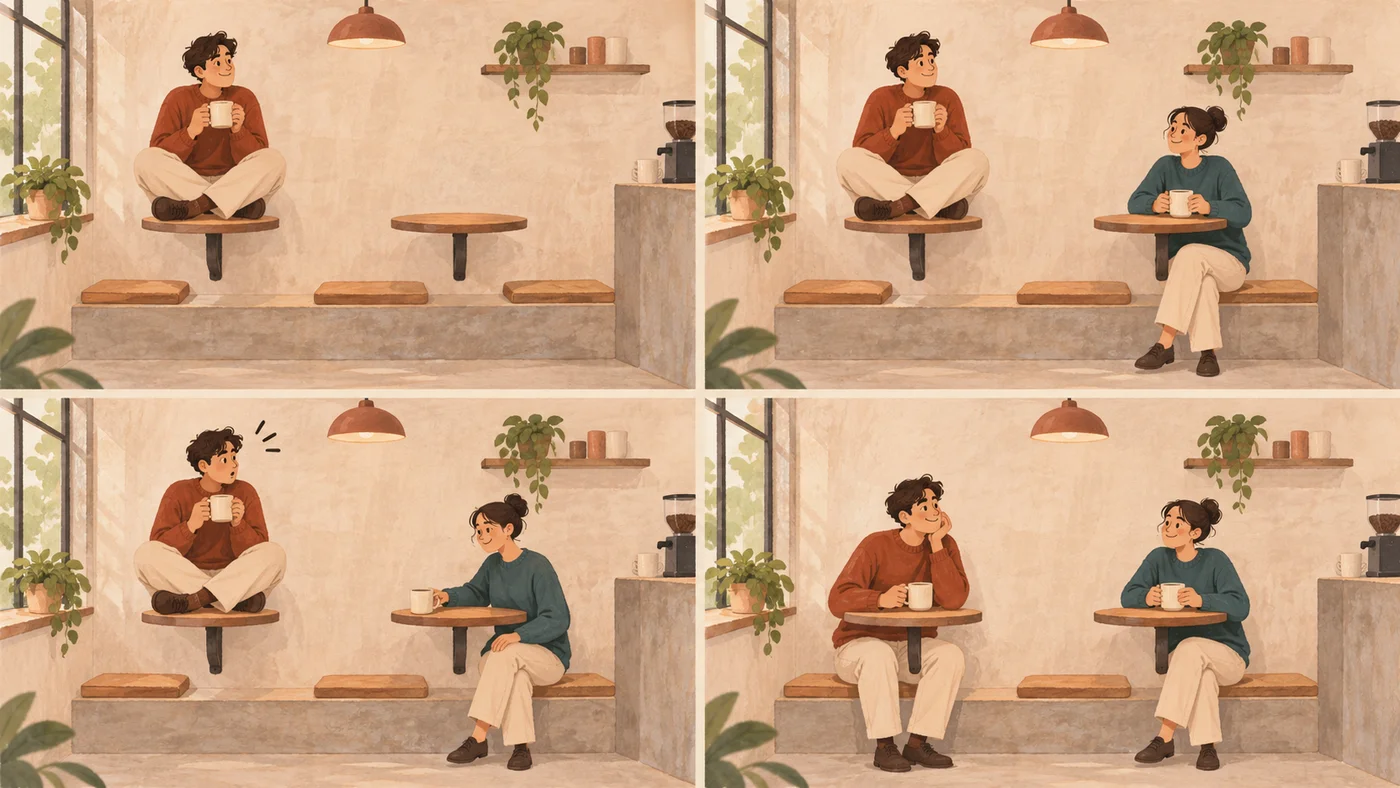
AI-generated action-order illustration, read left to right across the top row, then the bottom row. It is not an output-quality comparison or a frame sequence from the preset.
A cafe prompt you can adapt
Use this as one scene, with one continuous view. Connect your portraits through the reference controls supported by your chosen tool; the words “portrait one” cannot attach a file by themselves.
Create a vertical comedy scene in a minimalist cafe, using one steady wide shot.
Show a low concrete bench and two separate small round wall-mounted tables.
Keep the table surfaces and bench visible throughout.

The first customer is already perched on the left tabletop, holding a coffee
and behaving as though it is a normal seat. The arriving customer enters from
the right, sits on the bench at the other table and puts a cup on that table.

Only after that demonstration, the first customer looks toward the cup,
looks down at the surface they are sitting on and pauses. They move onto
the bench, put their coffee on the left table and try to look casual.
Finish with both customers seated on the bench at their separate tables.

Use portrait one for the first customer and portrait two for the arriving
customer when the tool supports separate identity references. Keep their
faces, clothes and roles distinct. Use natural, restrained movement.
Keep cups separate from hands and furniture. Avoid extra customers,
camera cuts and text over the action.
Choose duration, aspect ratio and reference settings in the tool where those controls exist. A prompt does not override a tool's available settings or create multi-person reference support. This example is not a tested guarantee of a specific result.
Start by changing the pair or the cafe's appearance, rather than the order of the actions. That preserves a clear comparison between attempts. For the format's background and examples, see the table-and-bench joke explained.
Check the story at three points
Pause near the beginning, the other customer's demonstration and the ending. These are story checkpoints, not exact timecodes that every version must follow.
At the beginning, ask whether the first customer is visibly using the wrong surface. During the demonstration, check that the arriving customer sits on the bench before using the table. At the ending, confirm that the first customer has changed position and the picture still contains the same two people and furniture.
Then watch normally. Correct still frames can conceal a jump, an impossible movement or a cup passing through a hand. The transition is part of the joke.
Fix the most consequential problem first
| Symptom | Check before retrying | In a prompt-capable tool | In the Fancy Cafe AI preset |
|---|---|---|---|
| The wrong person starts seated | Confirm which portrait belongs to each role | Match reference assignments to the role names | Put the intended first customer in Person 1 · Left |
| A face changes during movement | Compare the source portrait with the turning face | Simplify movement and use supported identity references | Try a sharper, unobstructed portrait; improvement is not guaranteed |
| The bench becomes another table | Check whether both surfaces are visible | Describe their separate functions and keep one wide shot | Review or regenerate; there is no furniture editor |
| The first customer moves too early | Identify whether the demonstration actually happens first | State the dependency once, clearly: move only after seeing the cup placed | A new result may be needed; timing is preset |
| Cups or hands merge | Inspect the contact frames at normal speed | Reduce simultaneous actions and extra props | Review the full result before deciding to use it |
| Text hides the discovery | Check both the video and the publishing preview | Request no text overlays, then inspect the result | Place your own caption away from the furniture and faces |
Do not change the lighting, cast, furniture, camera and timing all at once in response to one unclear gesture. Pick the failure that stops the audience understanding the scene, make one relevant change, and compare again.
If the action reads well but the outfit differs, decide whether that difference matters for your intended post. If the furniture is incoherent, improving the caption is unlikely to rescue the reveal.
Keep the preset and custom workflows separate
Fancy Cafe AI fixes the scene, camera setup and output at 15 seconds, 720p and 9:16. Each generation uses 500 credits at the time of this guide. Your main inputs are the two photos and their role assignments; the form does not expose shot-by-shot editing.
A prompt-capable tool gives you a place to request different actions or staging, subject to that tool's capabilities. More written instructions also create more details to reconcile. Begin with the essential scene, and add a variation only after the relationship between table and bench is clear.
For the complete upload and download flow, follow how to make the cafe video from two photos. Before another preset attempt, check the current cost on the generator and the available credit packs.
Product controls checked November 4, 2026. Prompt and review method are editorial guidance, not measured model-performance claims.